 ×
×
Project ManagementStudio
Enterprise-grade project management built natively for Creatio. Gantt charts, Kanban boards, AI-powered insights, pivot analytics — everything your PMO needs, zero code required.
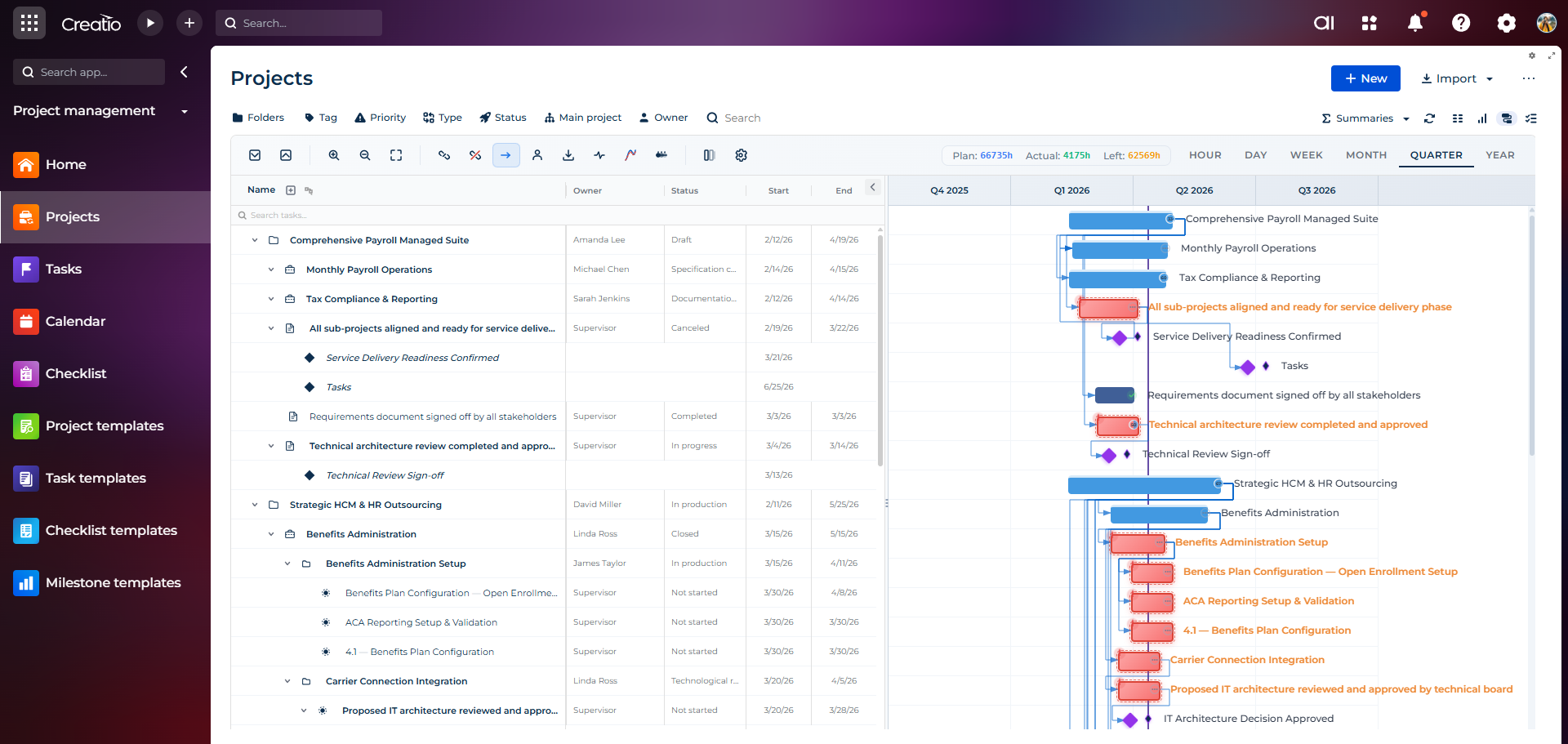
Every View You Need
Switch between powerful project views instantly — from high-level timelines to granular task management.
Interactive timeline with task dependencies, milestones, critical path, and resource planning. Drag to reschedule, link tasks, and track progress visually.
From Single Project to Enterprise Portfolio
Roll up hundreds of projects into portfolios and programs. Get C-level visibility with executive dashboards, hierarchical breakdowns, and real-time health monitoring across your entire organization.
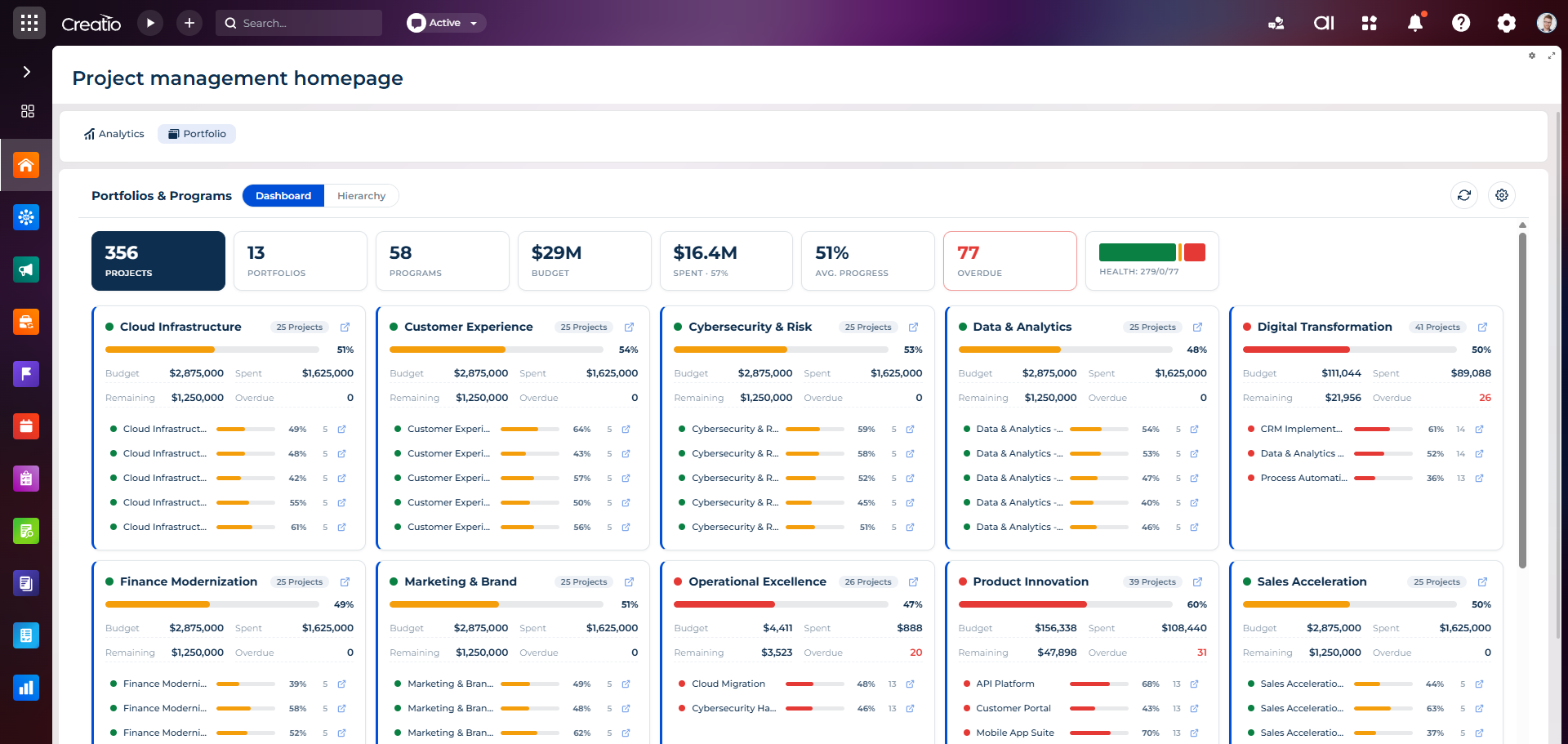
Executive command center: total projects, portfolios, programs, budget, spent, average progress, overdue alerts, and overall health — instantly. Each portfolio card surfaces budget vs spent, top programs, and live progress.
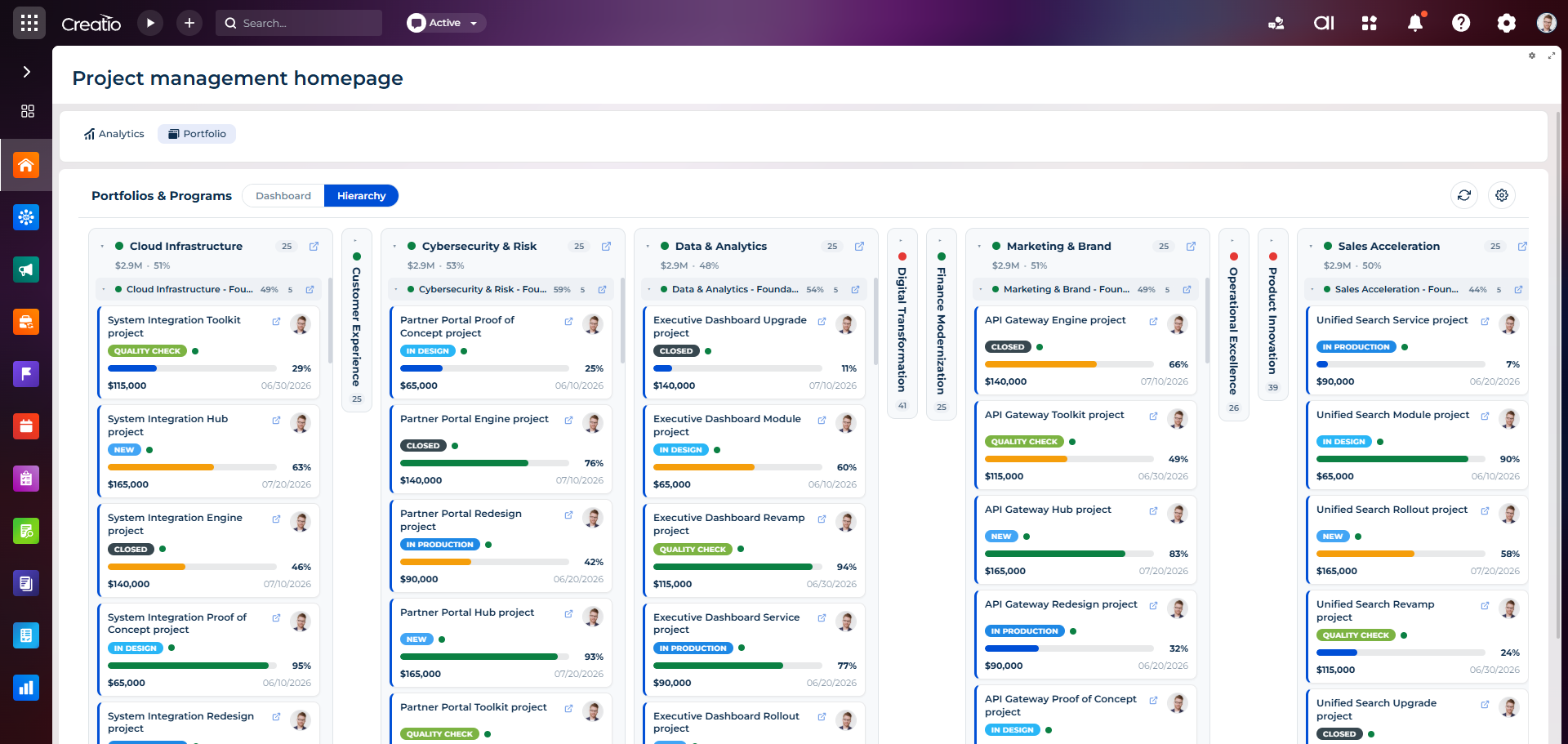
Visualize the full portfolio → program → project tree. Group by strategic theme, drill into any program, and track every project card with status badges, progress bars, budgets and due dates.
Portfolio Roll-Up
Aggregate budget, spend, progress, and health from every project up to portfolio and program level — automatically.
Executive KPI Cards
Total projects, portfolios, programs, budget, average progress, overdue and health metrics — on one screen for the C-suite.
Program Hierarchy
Group projects into programs and portfolios with unlimited nesting, expandable cards, and inline navigation.
Health Indicators
Color-coded portfolio status (Green / Yellow / Red) with at-risk highlighting and instant drill-down to problem projects.
Budget Tracking
Compare budget vs spent vs remaining at portfolio, program, and project level with overdue cost alerts.
Strategic Themes
Organize work by strategic initiatives — Digital Transformation, Operational Excellence, Product Innovation — to align execution with strategy.
Beyond the Basics
Deep-dive tooling built for real PMO operations — from monthly capacity planning to structured SOW ingestion and living project documentation.
Capacity Planning
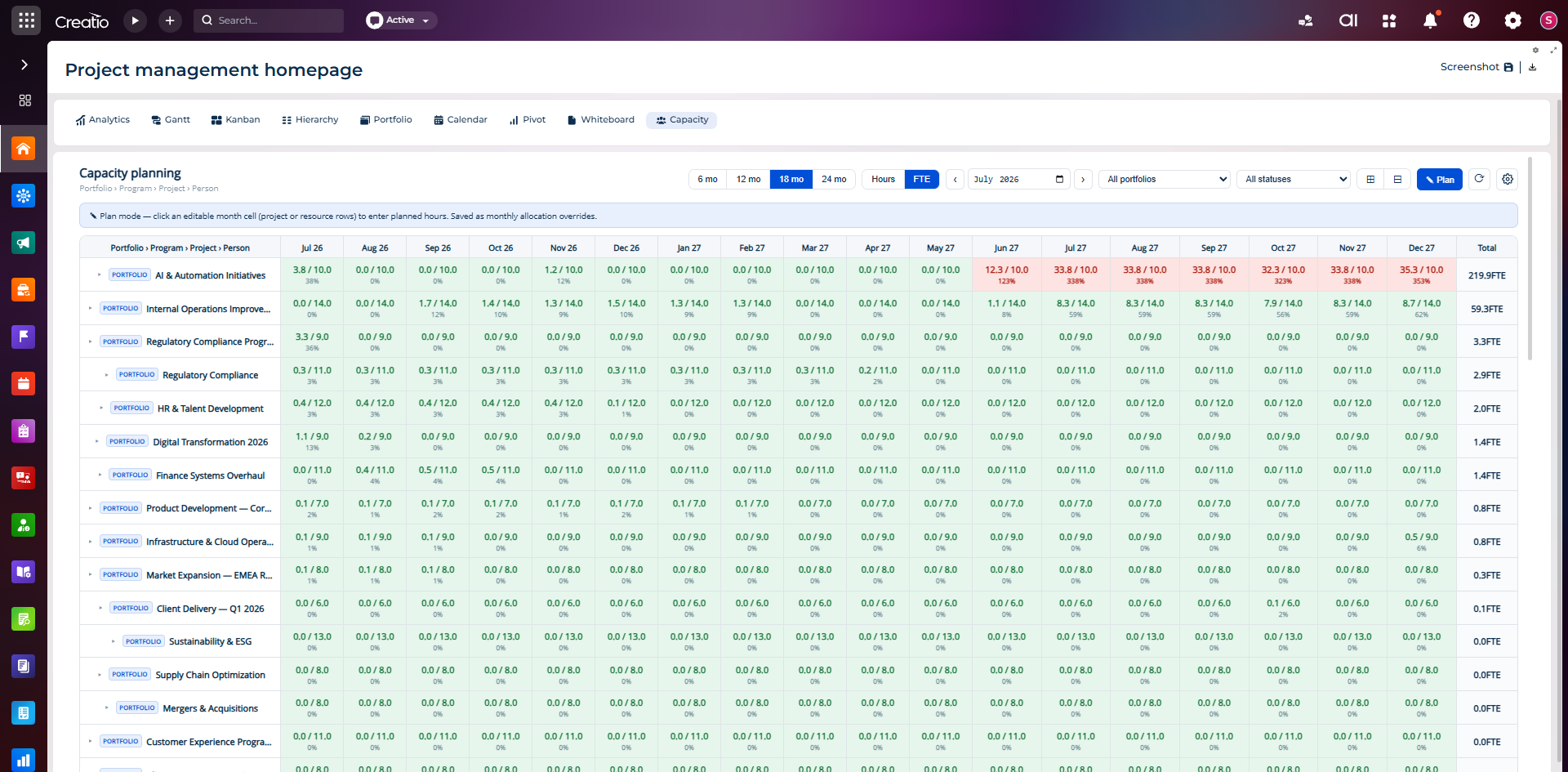
Plan resources across portfolios, programs, projects, and people with a monthly heatmap. Switch between hours and FTE, adjust from 6 up to 24 months, and click any cell to enter planned allocations. Overloaded periods are highlighted automatically so bottlenecks surface before they hurt delivery.
- Portfolio → Program → Project → Person breakdown
- Hours / FTE toggle, 6–24 months horizon
- Inline plan mode with monthly overrides
- Automatic overallocation highlighting
SOW Import & Project Creation
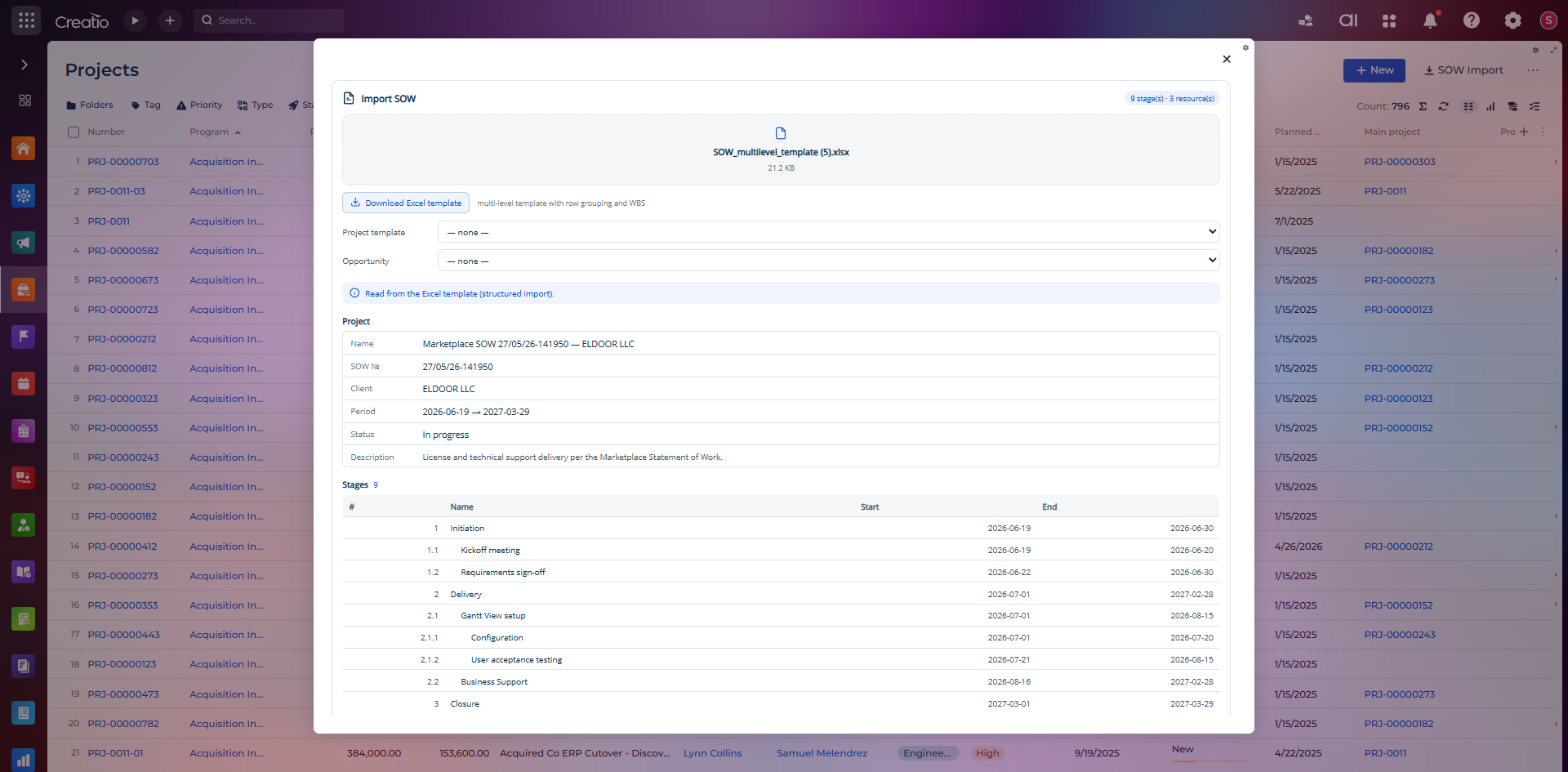
Turn a Statement of Work into a fully structured project in one click. Upload a multilevel Excel template with WBS row grouping and PM Studio parses stages, sub-stages, resources, client, period and description — then creates the project, stages and tasks automatically.
- Multilevel Excel template with WBS grouping
- Auto-parsed stages, sub-stages & resources
- Client, SOW №, period and status detected
- One-click project creation with template mapping
Project Documentation
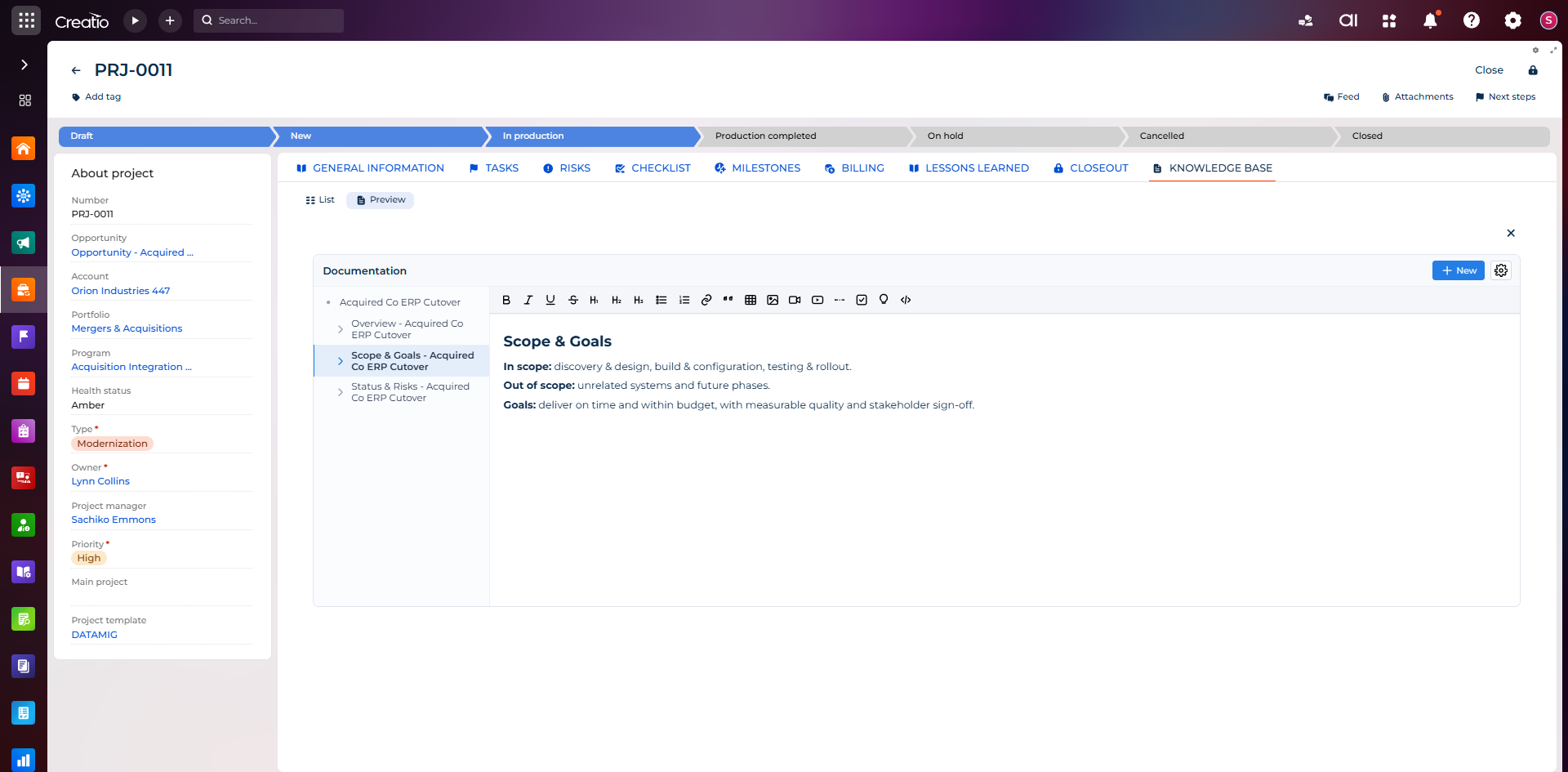
A built-in knowledge base for every project. Capture scope & goals, out-of-scope, status & risks, lessons learned and closeout in a rich editor — with tables, images, videos, embeds and checklists — all linked to the project card and searchable across the portfolio.
- Structured pages: scope, risks, milestones, closeout
- Rich editor: tables, images, video, embeds, code
- Nested pages with in-project navigation
- Lives on the project card, always in sync
Turn Delivery Into Revenue
Close the loop from Statement of Work to invoice. PM Studio ships a full billing suite: billing plans, invoices, project closeouts and SOWs — all linked to the project and running natively in Creatio.
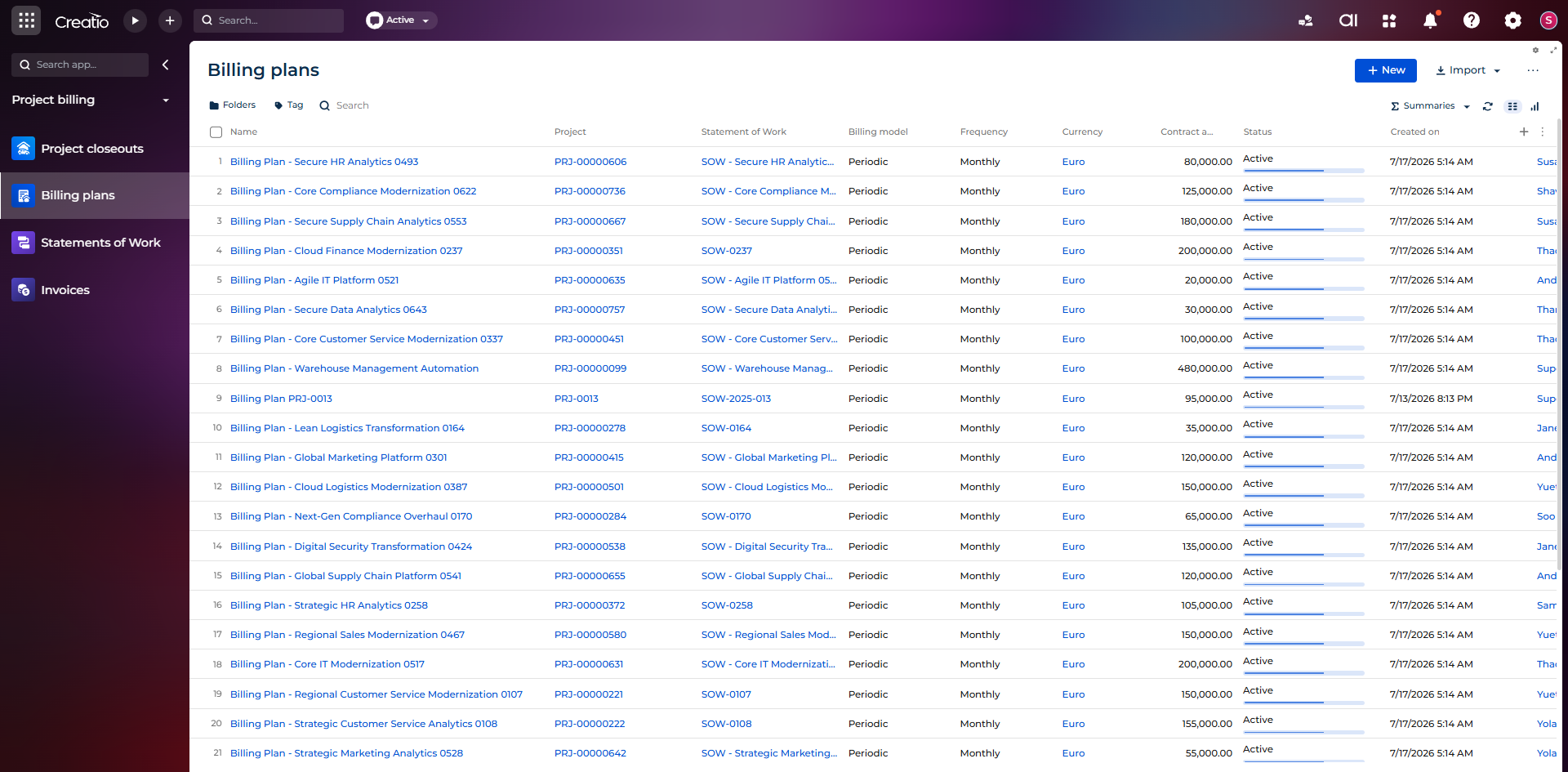
Billing Plans section: every plan linked to its Project and SOW, with billing model, frequency, currency, contract amount, status and progress bar — right inside Creatio.
Billing Plans
Define periodic or milestone-based billing plans per project with currency, contract amount, frequency and live status.
Invoices
Auto-generate invoices from billing plans and delivered work — track amounts, status, due dates and payments.
Project Closeouts
Formal project closeout workflow with acceptance, final billing, lessons learned and archived documentation.
Statements of Work
SOW registry linked to projects and billing plans — scope, period, value and status kept in sync end to end.
Everything for Project Success
Gantt Chart
Interactive timelines with task dependencies, milestones, critical path analysis, baseline comparison, and multi-level hierarchy.
Kanban Board
Visual workflow management with drag-and-drop cards, swimlanes, WIP limits, custom columns, and real-time collaboration.
Hierarchical Lists
Tree-structured data with expandable rows, parent-child rollups, progress aggregation, and unlimited nesting levels.
To-Do & Checklists
Task management with prioritized checklists, due dates, assignments, completion tracking, and template-based creation.
Pivot Analytics
Multi-dimensional data analysis with drag-and-drop fields, custom formulas, chart visualization, and Excel export.
Resource Scheduler
Day/week/month/year calendar views with agenda mode, resource allocation timeline, and drag-and-drop task assignment.
Real-Time Dashboards
KPI cards, project status distribution, delayed alerts, progress gauges, and custom widgets — all in one glance.
Advanced Analytics
Multi-dimensional breakdowns by type, owner, priority, status. Budget tracking, trend analysis, and S-Curve performance charts.
AI Agent
Intelligent project assistant that analyzes risks, identifies overdue tasks, suggests resource reallocation, and generates status reports.
Project & Task Templates
Reusable templates for projects, tasks, checklists, and milestones. Standardize workflows and accelerate project setup.
Fully No-Code
Configure every aspect through Freedom UI designers. Custom fields, layouts, business rules, and automations — zero development needed.
Built for Enterprise PMO
Resource Management
Track team workload, allocate resources across projects, and prevent overallocation with visual capacity planning.
Budget & Cost Control
Plan budgets, track actual costs, monitor burn rates, and get alerts when projects exceed thresholds.
Multi-Project Portfolio
Manage cross-project dependencies, shared resources, and portfolio-level dashboards for executive visibility.
Time Tracking
Log hours against tasks, compare planned vs actual duration, track overtime, and generate timesheet reports.
Milestone Tracking
Define key milestones with dependencies, track progress, get notifications on at-risk milestones.
Custom Dashboards
Build personalized dashboards with KPI cards, charts, and widgets tailored to any stakeholder role.
Automations & Workflows
Automate status transitions, notifications, escalations, and approvals with Creatio's process engine.
Reports & Export
Generate project reports, export to Excel, PDF, and share scheduled reports with stakeholders.
Human + AI Collaboration
Unleash the full potential of your PMO with AI agents that work alongside your team — analyzing, automating, and accelerating every project workflow.
Project Management Agent
Creates project structures from templates, assigns tasks, tracks progress, reports delays and budget deviations.
Analytics Agent
Calculates aggregated values, generates charts, analyzes trends, and provides data-driven insights across your portfolio.
Filter Agent
Creates dynamic folders and smart filters from natural language requests, organizing your project data instantly.
Productivity Agent
Supports daily productivity tasks — scheduling, reminders, workload balancing, and intelligent task prioritization.
Real Business Impact
Faster project setup with AI-generated structures and templates
Reduction in overdue tasks through proactive risk detection
Always-on project monitoring and intelligent alerts
Less time spent on status reporting and data aggregation
Ready to elevate your Creatio PMO?
Get the complete project management studio. Install in minutes, configure without code, and manage projects like never before.