Creatio×Syntech

    Project Management Studio 2.4 for Creatio

    Plan delivery, track billable time and control project access — one workspace for professional services teams in Creatio.

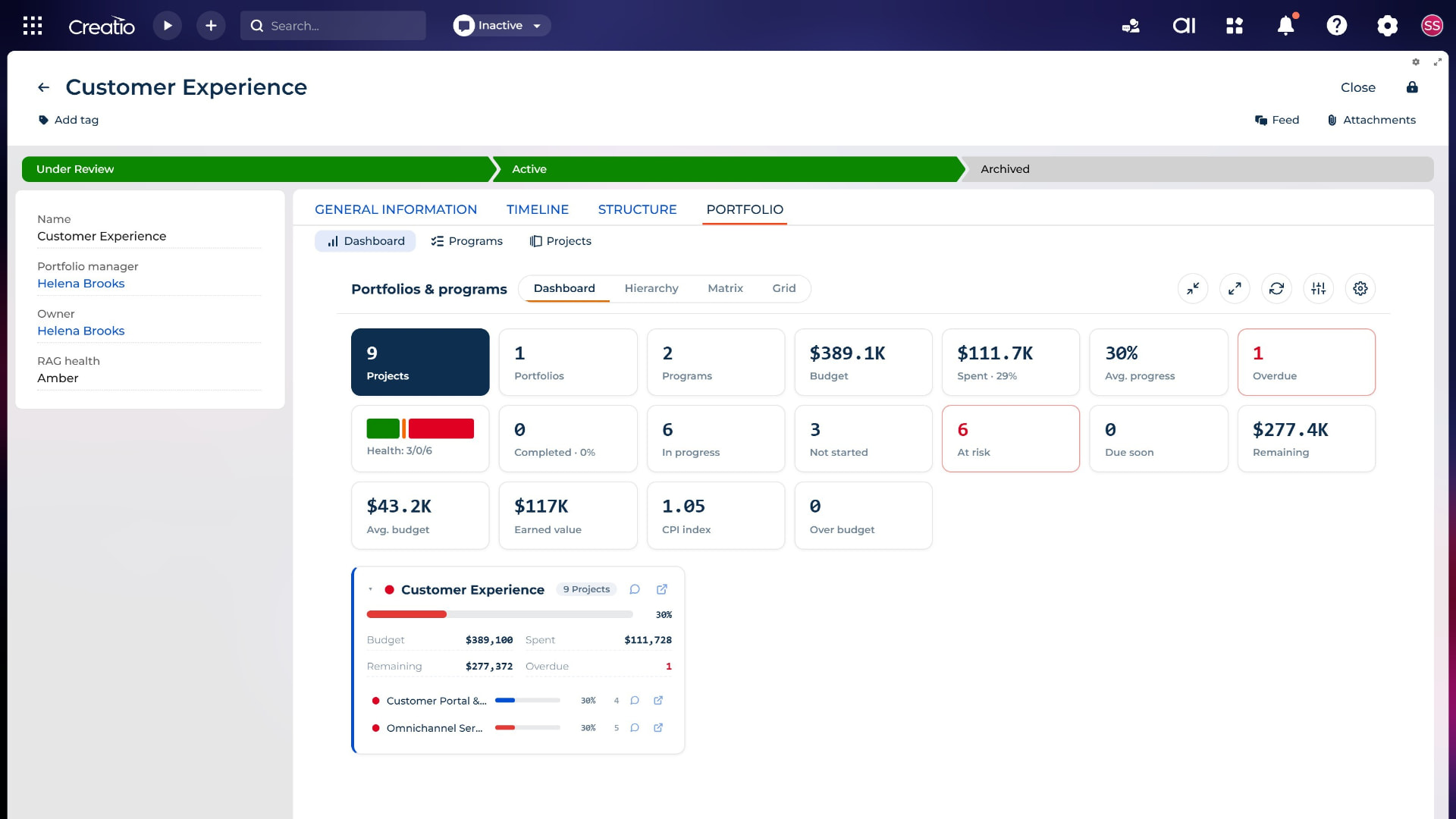
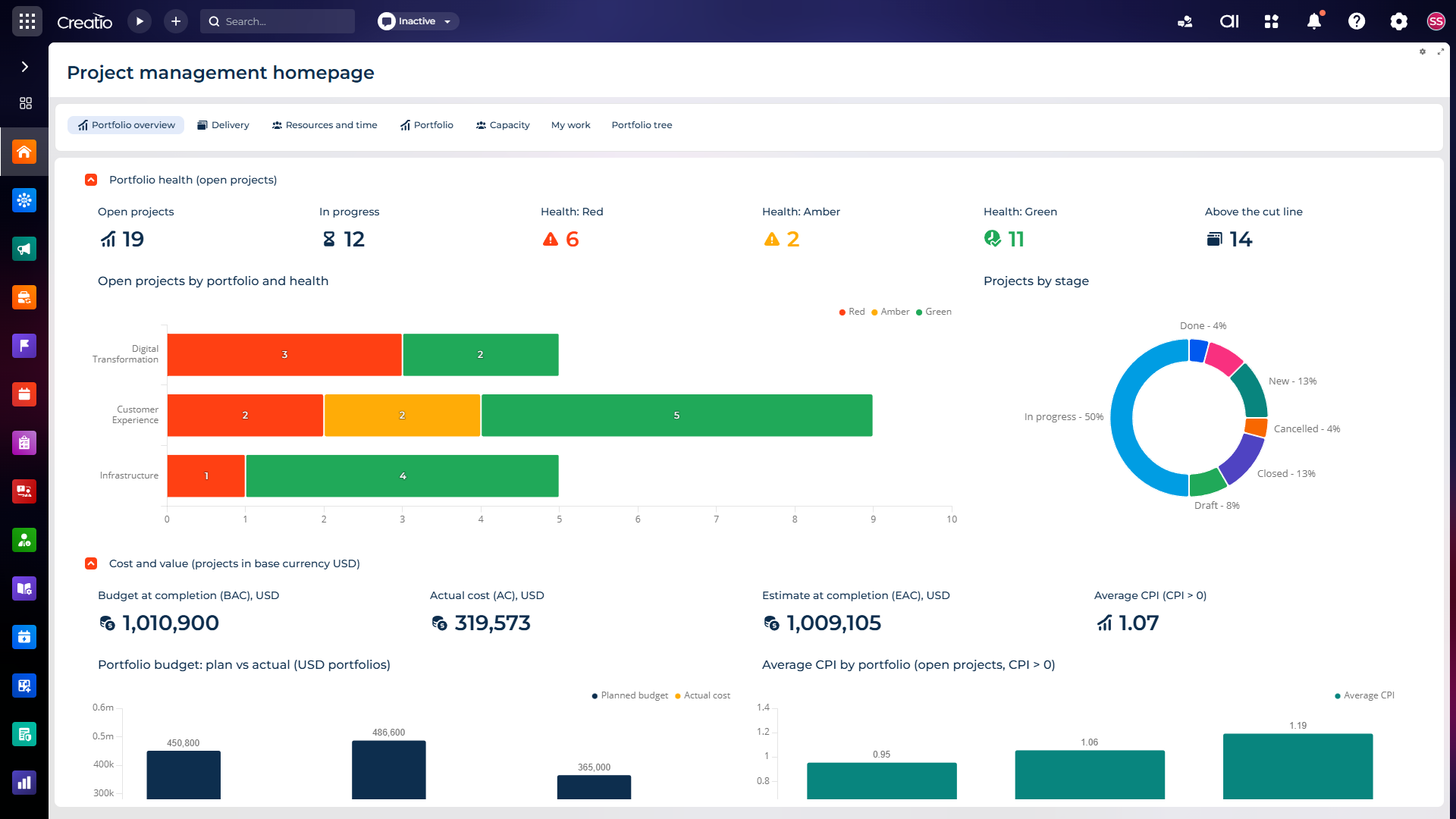
    Creatio Customer Experience portfolio dashboard with projects, programs, budgets and health indicators
    New: time tracking with a Chrome extension, TMetric sync and migration from JiraTime TrackingMigration
    New in 2.4

    Track time, bring your history, control access

    Your project work, hours and permissions — together in Creatio.

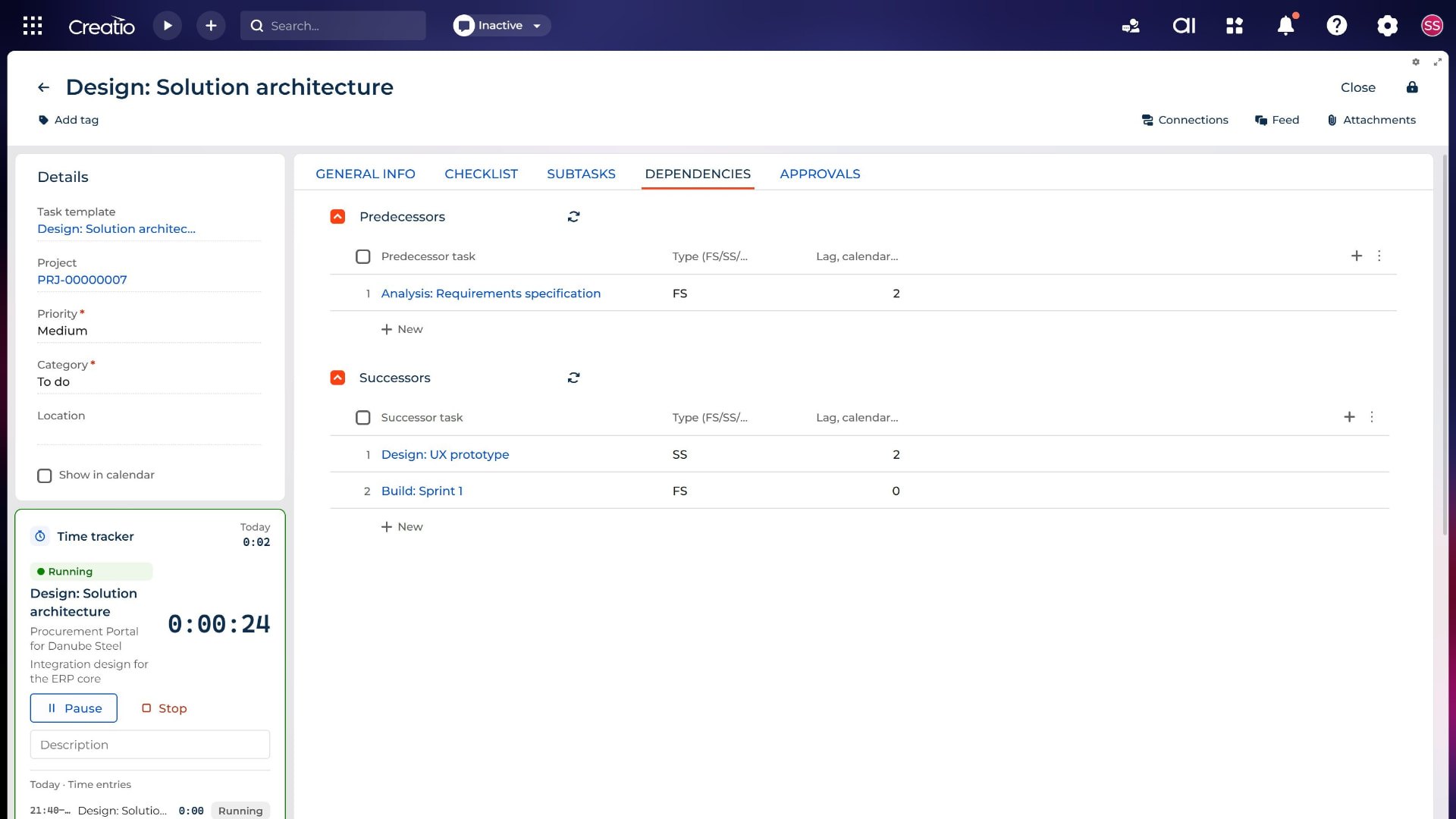
    Creatio task with a running embedded time tracker, elapsed time, Pause and Stop controls

    Time Tracking

    A real timer inside Creatio, straight into PM timesheets. Keep TMetric; sync hours and approval status to PM.

    Time Tracking
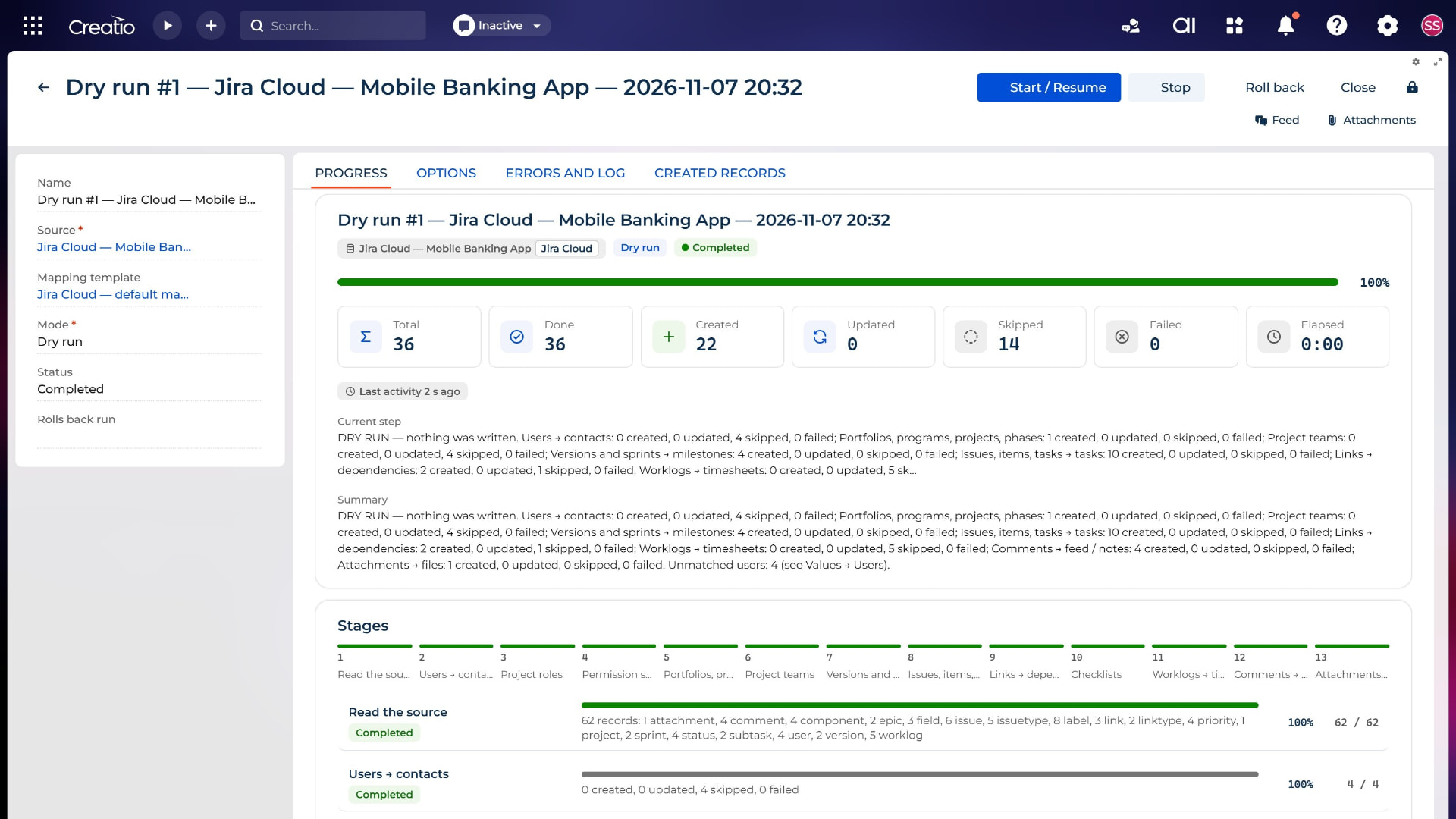
    Completed Jira Cloud migration dry run showing record checks, stage progress, log and Roll back action

    Migration

    Move from Jira, Monday or ClickUp with a dry run and rollback.

    Migration
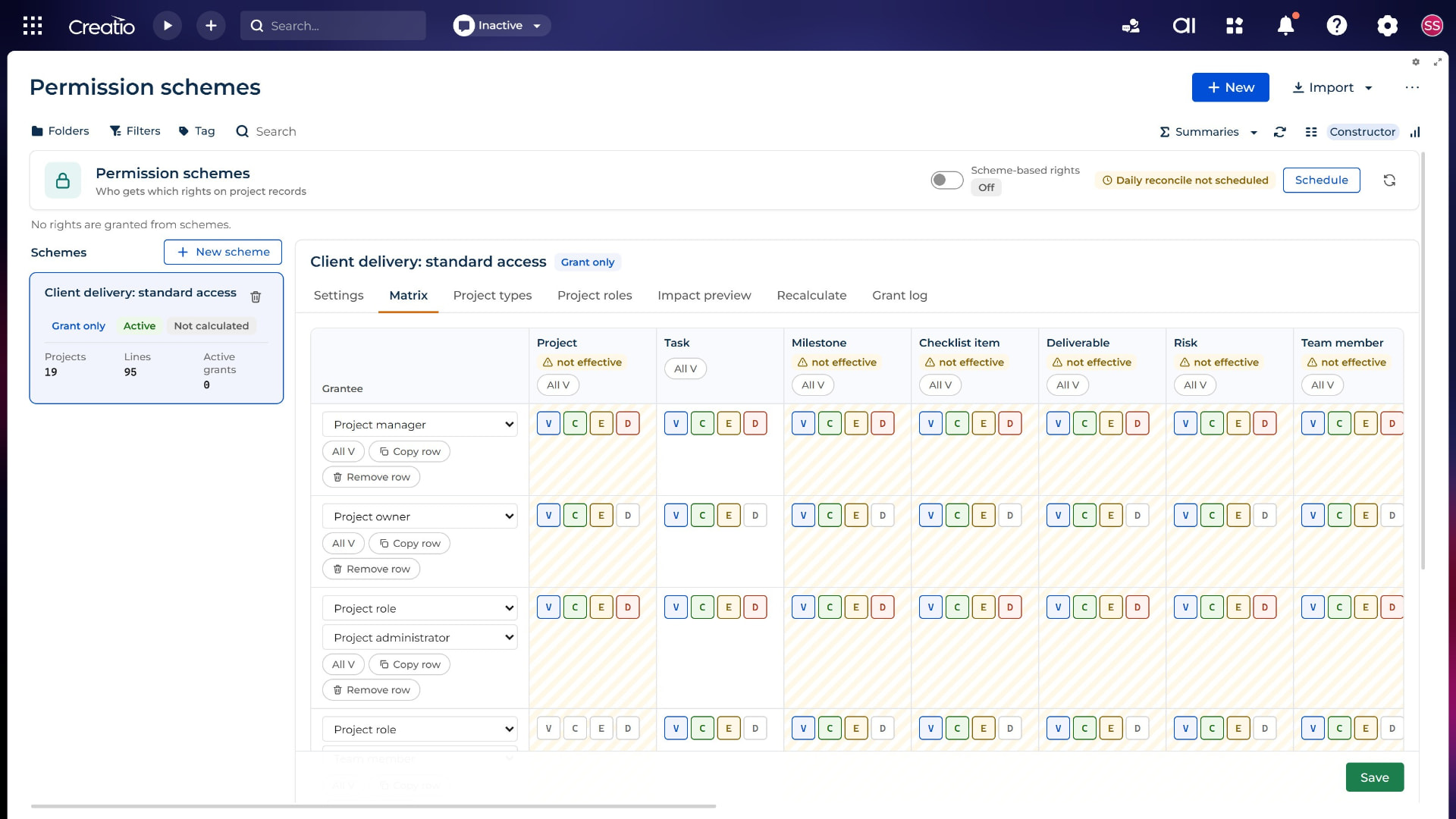
    Creatio permission scheme role matrix in Grant only mode with scheme-based rights switched off

    Permission schemes

    Define who can view, edit, approve and log time on each project with a role-and-permission matrix; start in grant-only mode and switch enforcement on when ready.

    Permission schemes
    FOR PROFESSIONAL SERVICES

    Every project profitable — from deal to final invoice in Creatio

    Built for firms that sell expertise by the hour, by milestone or by subscription.

    Under-utilised experts

    See billable load by person and week before the bench grows.

    Budgets drifting into the red

    CPI, EAC and margin per project flag overruns early.

    Slow invoicing

    Approved milestones and timesheets turn into invoices without spreadsheets.
    Used by:ConsultingIT servicesEngineeringMarketing agenciesLegal & advisory
    PROJECT LIFECYCLE

    One flow from sale to closeout

    1. 1
      Deal
      Won opportunity in Creatio CRM
    2. 2
      SOW
      Import scope and create the project
    3. 3
      Project
      Plan, dependencies, baseline
    4. 4
      Resources
      Capacity and staffing requests
    5. 5
      Timesheets
      Logged and approved hours
    6. 6
      Milestones
      Conditions and approvals
    7. 7
      Invoice
      Billing plans and invoices
    8. 8
      Closeout
      Final review and lessons learned
    BY ROLE

    Each role gets its own workspace

    • Compare portfolio margin and health
    • Rank projects by score and stage gate
    • Run what-if scenarios against the budget cap
    Portfolio overview dashboard with health, margin and budget
    ENGAGEMENT MODELS

    Fits how you sell your work

    Fixed price

    Deliver scope on budget with milestone acceptance.

    SOW importMilestonesEVM

    Time & materials

    Bill approved hours with full traceability.

    TimesheetsApprovalsBilling add-on

    Retainer & support

    Track monthly capacity and service consumption.

    CapacityTimesheetsDashboards

    Multi-phase program

    Govern phases with stage gates and portfolio scoring.

    ProgramsStage gatesScenarios

    Invoicing uses Syntech Project Billing — an optional add-on.

    WHAT YOU CONTROL

    Services metrics, out of the box

    Billable utilisation
    Approved hours against capacity
    Project margin
    Budget, actual cost and EAC
    Milestone-to-invoice time
    From acceptance to billing
    Forecast accuracy
    CPI, SPI and variance at completion
    IMPLEMENTATION

    Live in weeks, not months

    01
    Install
    From Creatio Marketplace, no code
    02
    Configure
    Portfolios, roles, rates, gates
    03
    Migrate
    Import active projects and SOWs
    04
    Go live
    Train the team and track results
    See It In Action

    Every View You Need

    Switch between powerful project views instantly — from high-level timelines to granular task management.
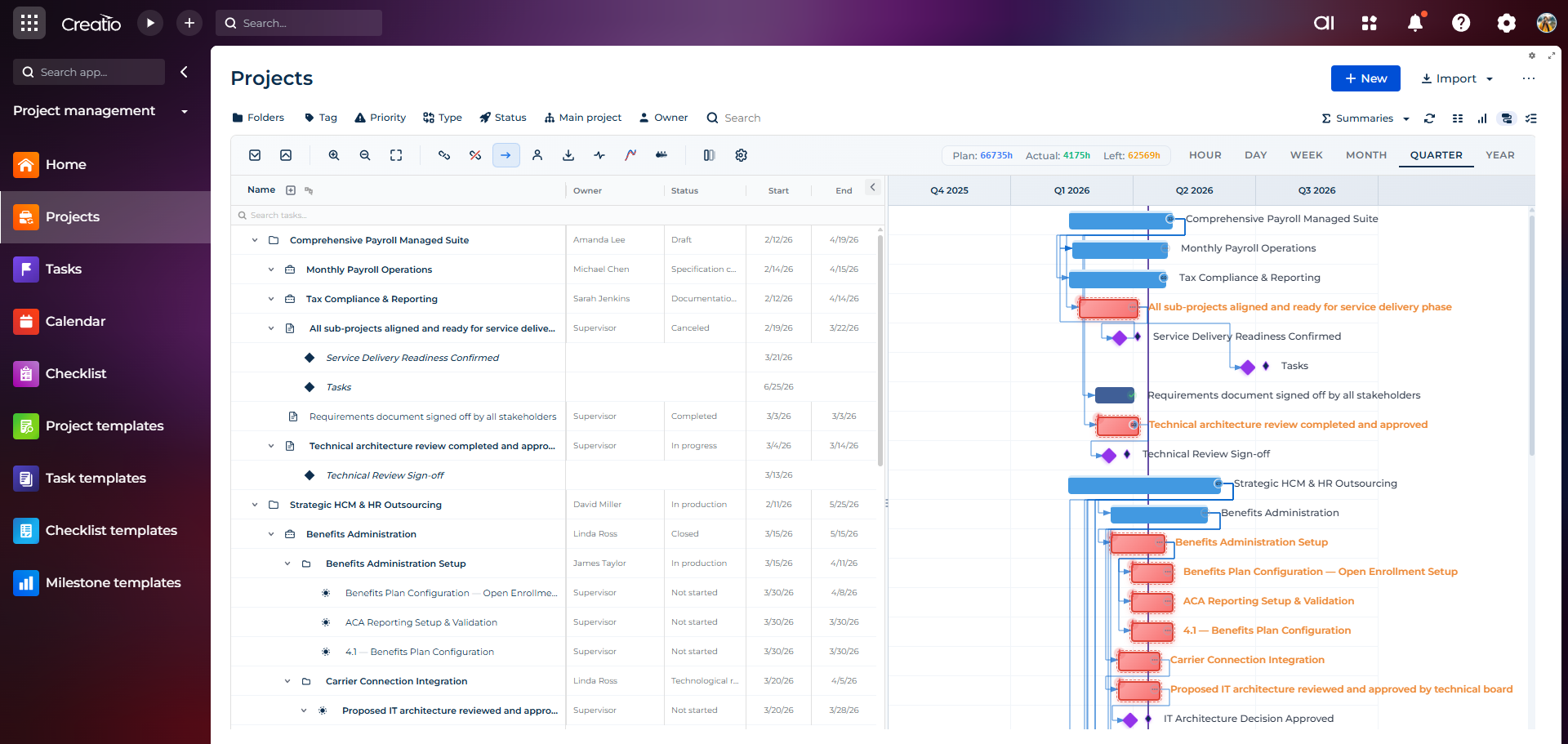
    Gantt Chart

    Interactive timeline with task dependencies, milestones, critical path, and resource planning. Drag to reschedule, link tasks, and track progress visually.

    Explore all PM Studio capabilities
    PM STUDIO 2.4

    See it in 5 minutes

    Portfolio & Programs

    From Single Project to Enterprise Portfolio

    Roll up hundreds of projects into portfolios and programs. Get C-level visibility with executive dashboards, hierarchical breakdowns, and real-time health monitoring across your entire organization.
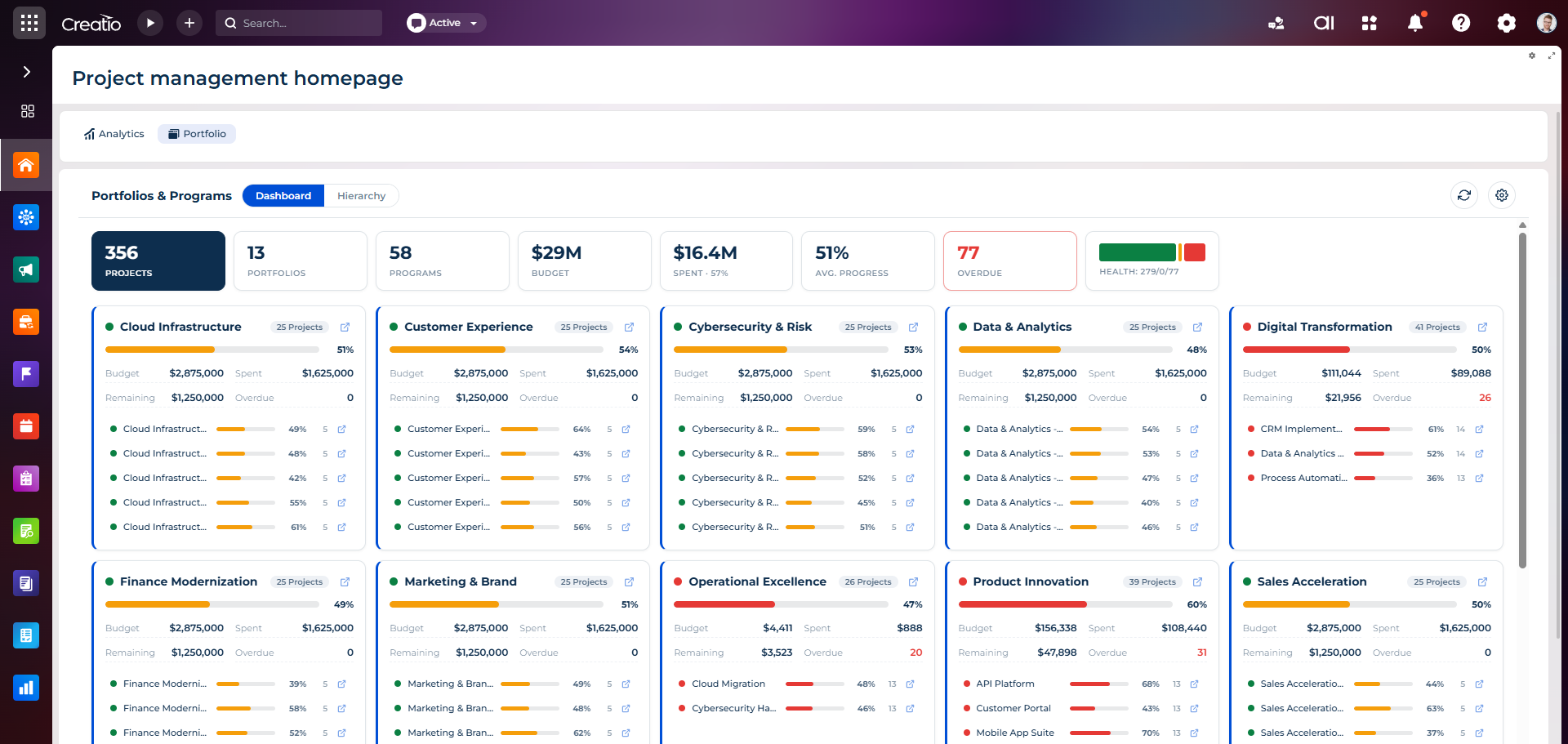
    Portfolio Dashboard
    Portfolio Dashboard

    Executive command center: total projects, portfolios, programs, budget, spent, average progress, overdue alerts, and overall health — instantly. Each portfolio card surfaces budget vs spent, top programs, and live progress.
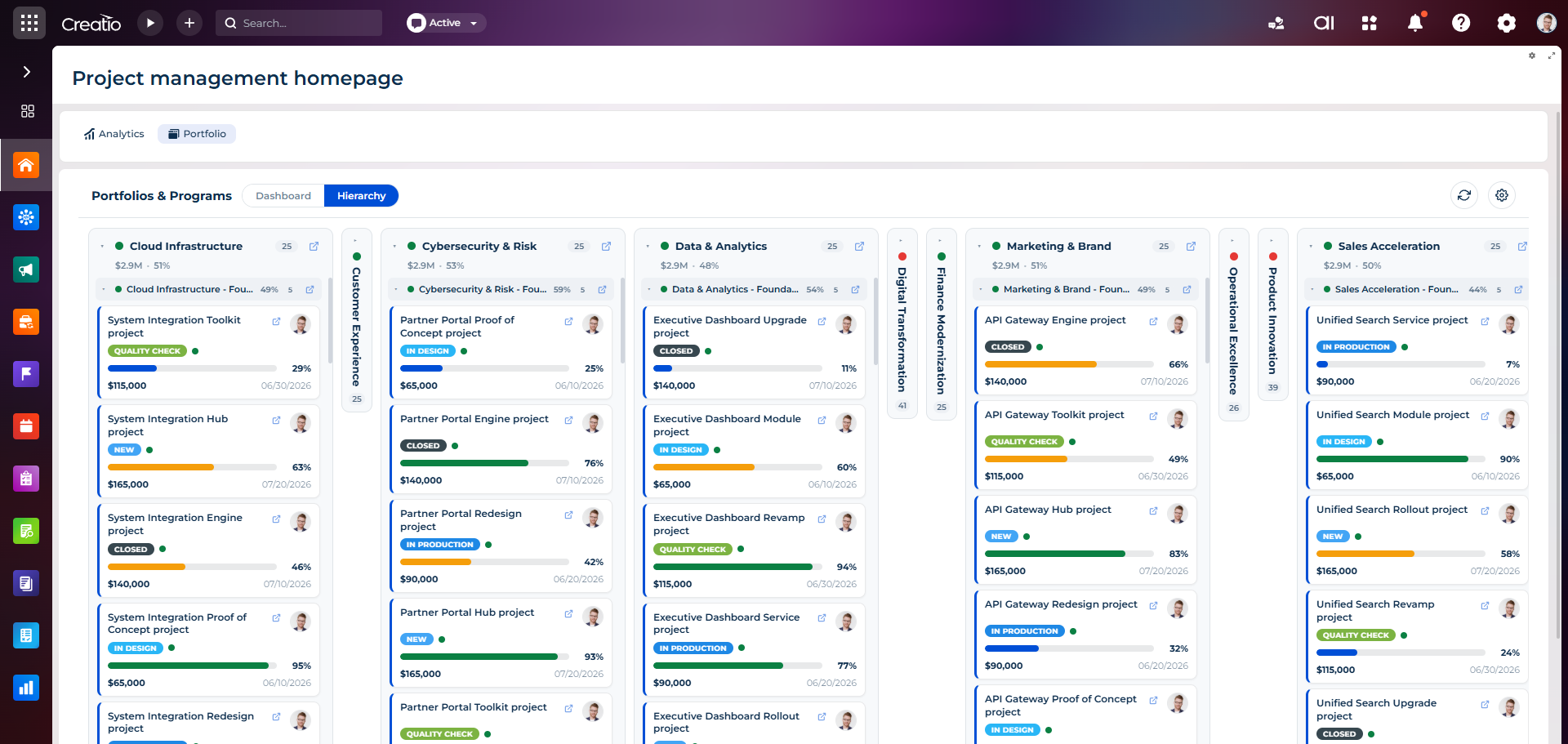
    Programs Hierarchy
    Programs Hierarchy

    Visualize the full portfolio → program → project tree. Group by strategic theme, drill into any program, and track every project card with status badges, progress bars, budgets and due dates.

    Portfolio Roll-Up

    Aggregate budget, spend, progress, and health from every project up to portfolio and program level — automatically.

    Executive KPI Cards

    Total projects, portfolios, programs, budget, average progress, overdue and health metrics — on one screen for the C-suite.

    Program Hierarchy

    Group projects into programs and portfolios with unlimited nesting, expandable cards, and inline navigation.

    Health Indicators

    Green / Amber / Red, calculated automatically from schedule and CPI/SPI, with instant drill-down to problem projects.

    Budget Tracking

    Compare budget vs spent vs remaining at portfolio, program, and project level with overdue cost alerts.

    Strategic Themes

    Organize work by strategic initiatives — Digital Transformation, Operational Excellence, Product Innovation — to align execution with strategy.

    AI-Powered Project Intelligence

    Human + AI Collaboration

    Unleash the full potential of your PMO with AI agents that work alongside your team — analyzing, automating, and accelerating every project workflow.

    Project Management Agent

    Creates project structures from templates, assigns tasks, tracks progress, reports delays and budget deviations.

    Build projects from templates
    Create & assign tasks
    Track progress & costs
    Report risks & delays

    Analytics Agent

    Calculates aggregated values, generates charts, analyzes trends, and provides data-driven insights across your portfolio.

    Aggregated calculations
    Chart generation
    Trend analysis
    Portfolio insights

    Filter Agent

    Creates dynamic folders and smart filters from natural language requests, organizing your project data instantly.

    Natural language filters
    Dynamic folders
    Smart categorization
    Instant data access

    Productivity Agent

    Supports daily productivity tasks — scheduling, reminders, workload balancing, and intelligent task prioritization.

    Smart scheduling
    Workload balancing
    Task prioritization
    Daily planning

    Real Business Impact

    3×

    Faster project setup with AI-generated structures and templates

    40%

    Reduction in overdue tasks through proactive risk detection

    24/7

    Always-on project monitoring and intelligent alerts

    60%

    Less time spent on status reporting and data aggregation

    Typical results reported by customers.

    🚀 Transform Your Project Management

    Ready to elevate your Creatio PMO?

    Get the complete project management studio. Install in minutes, configure without code, and manage projects like never before.

    View on Marketplace